


VITA - Video Editor & Maker
SNOW Corporation
I spent time with VITA as a quick, mobile-first editor rather than treating it like a miniature desktop production suite. That distinction matters. The app is built for people who want to turn phone clips into something shareable without learning a complicated timeline, and its strongest moments come when speed, templates, and visual polish matter more than detailed control. If you regularly record short trips, meals, pets, outfits, or everyday moments, it can make the jump from scattered clips to a finished video feel pleasantly manageable.
VITA is a free video editing app from SNOW Corporation in the Video Players & Editors category. It is available for Everyone, supports Android 8.0 and later, and its current version is 302.0.18. The app has been available since December 26, 2019, and its reach is substantial: it has passed 100 million installs, with a 4.2 average from around 958 thousand ratings. Those figures do not automatically make it right for every editor, but they do tell me that VITA has become a familiar option for casual mobile creation.
Trust starts with what the app lets me see and control
When I review an editing app, I do not judge trust only by how attractive the finished video looks. I also pay attention to the moments where the app asks me to choose something: selecting media, applying a template, exporting a project, or deciding whether a trend is actually useful. VITA feels most comfortable when I remain deliberate about those choices instead of tapping through screens automatically.
The first practical trust check is simple: I can decide which clips enter a project. That sounds obvious, but it is important on a phone because a gallery often contains personal conversations, family images, screenshots, and work material alongside the footage I want to edit. I recommend selecting only the specific items needed for a project rather than granting myself a habit of browsing through everything. This is a small workflow change, but it keeps the editing session focused and reduces accidental choices.
The app’s appeal is closely tied to its trendy presentation. That can be helpful because it gives me a visual starting point, especially when I do not know how to structure a short video. At the same time, a template-led experience can encourage fast decisions. Before accepting a style, I look at the order of the clips, the pacing, the text treatment, and the overall mood. A fashionable effect is not automatically suitable for a birthday memory, a product demonstration, or a quiet travel diary.
Latest News

Uber Eats Under Pressure: What Happens When Delivery Goes Wrong

How QR & Barcode Scanner Adapts to Android and iOS Innovations

Why Waze Navigation & Live Traffic Is Your Essential Travel Companion

CapCut Mastery: Unleash Hidden Features for Pro-Level Editing

How OS Updates Enhance Roblox Adventures

Teacher Simulator: Exam Time Turns Quick Classroom Judgments into a Repetitive Loop
My main trust habit with VITA is to preview before exporting. I check every cut, title, transition, and audio moment as a viewer would see it. This catches more than technical mistakes. It also reveals whether the template has changed the meaning of a clip, placed text over a face, or made a personal moment feel overly dramatic. The preview is where user control becomes practical rather than theoretical.
What the editing workflow feels like in daily use
VITA makes the most sense when I have a clear, modest goal: a short vertical montage, a quick social post, or a polished clip to send to friends. I can begin with several phone recordings, arrange them into a sequence, and use the app’s visual tools to give the result a consistent look. The experience is less intimidating than opening a professional editor filled with tracks, panels, and technical settings.
A realistic example is a Saturday market visit. I might record the entrance, a close-up of food, a few moving shots, and a final view of the street. Instead of sending six disconnected clips, I would use VITA to build a compact sequence, place the strongest image near the beginning, and remove pauses where the camera was still being raised. I would keep the natural sound only where it adds atmosphere and avoid letting every transition compete for attention. The app is useful here because it helps me reach a presentable result without turning a simple memory into a long editing project.
Gallery
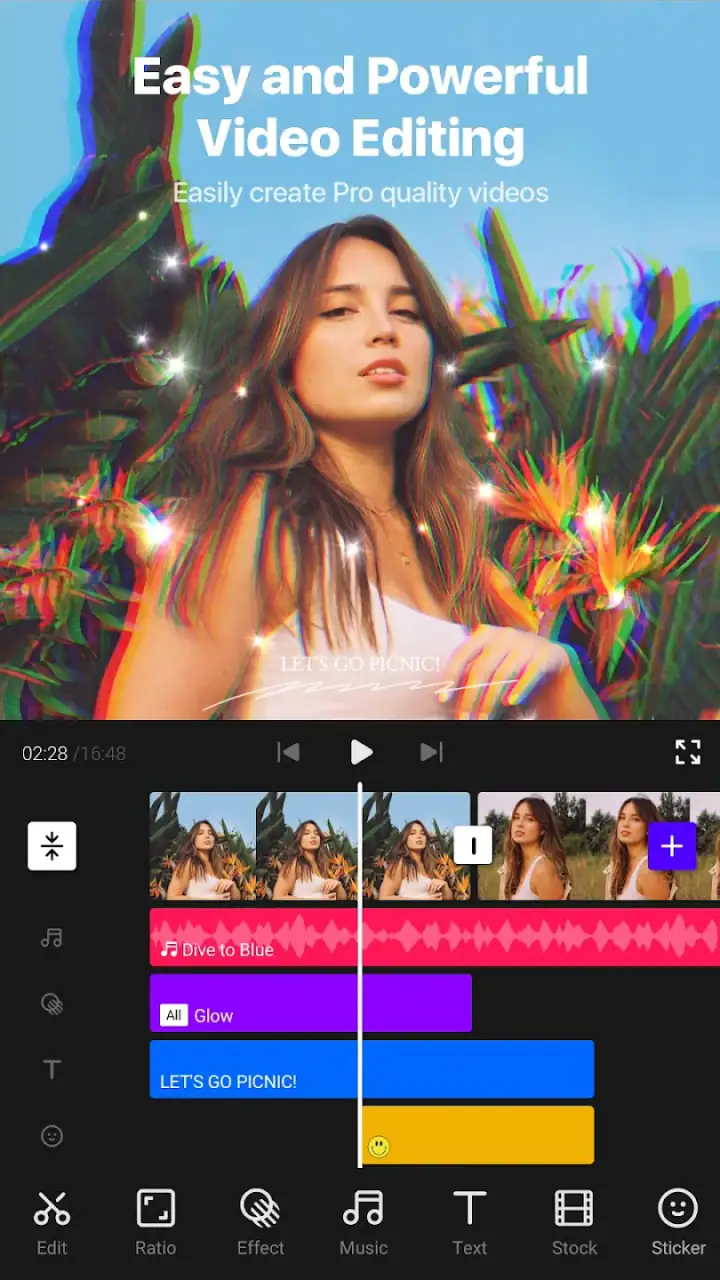
Another good use is a small personal announcement. If I want to show a new room, a hobby project, or a weekend activity, the app can help me combine detail shots with a beginning and an ending. The important technique is to record with the edit in mind. Short, steady clips give VITA more useful material than one long recording full of camera movement. The editor can organize footage, but it cannot fully rescue footage that is consistently blurry, poorly framed, or badly lit.
I also find it useful for people who prefer visual guidance. A blank timeline can make beginners wonder what to do next, while a current-looking template suggests a rhythm and a structure. That guidance reduces the time spent staring at an empty project. The trade-off is that the result may look familiar if I follow the suggested style too closely. To make a video feel personal, I would change the order, remove unnecessary decoration, and choose clips that tell a specific story rather than simply filling every available slot.
Controls matter more than a polished first impression
The most important question for a casual editor is not whether the app can produce an attractive preview. It is whether I can correct the parts I dislike without fighting the interface. In VITA, I would test this immediately by importing more clips than I need, trimming the weakest ones, and checking whether the remaining sequence still makes sense. This reveals whether the workflow supports real editing decisions or only quick template replacement.
I would also test the text carefully. Titles are often where automatic styles become inconvenient. A caption may need to remain on screen longer than the template expects, or it may need to move away from a subject’s face. I do not treat a default placement as final. I read the text on a small phone screen, check contrast against bright footage, and watch the video once without touching the controls. If the message is hard to read during normal playback, it needs adjustment or removal.
Music and sound deserve the same caution. A soundtrack can make a short montage feel finished, but it can also overpower spoken words, street ambience, or a meaningful reaction. For a family clip, I might prefer natural sound in one section and a quieter musical bed elsewhere. For a product or tutorial-style video, clear speech matters more than a trendy beat. VITA is better suited to expressive short edits than to projects where precise audio mixing is the central requirement.
A useful advanced habit is to make a rough version first and a clean version second. In the rough pass, I choose the story and ignore small decoration. In the clean pass, I inspect transitions, text timing, sound balance, and the opening and closing moments. This prevents me from spending time perfecting a style before discovering that the sequence itself is confusing.
Where privacy and data-sensitive moments deserve attention
Video editing naturally involves sensitive material, so I pay attention to context even when an app feels easy to use. A phone may contain children’s faces, home interiors, travel documents, workplace screens, or private conversations. Before importing anything into a project, I ask whether every visible detail belongs in the final video. Cropping or replacing a clip is often wiser than assuming a filter or transition will hide something reliably.
I am especially careful with footage recorded in public. A background face, car plate, school logo, or house number can appear for only a moment and still be identifiable. VITA can help me assemble a video, but it does not remove my responsibility to inspect the frame. I pause on busy scenes and review them at normal size before sharing. If the app’s editing tools do not give me the precision I need for a sensitive detail, I would use a more specialized editor or avoid publishing that clip.
Account and sharing choices also deserve a deliberate approach. I do not connect a project to a broader audience simply because a template makes the video look ready. I first decide who actually needs to see it. A private family memory, a work-related recording, and a public social post have different risk levels. The safest workflow is to finish the edit, inspect the exported result, and then choose the narrowest sharing route that fits the purpose.
I also avoid putting unnecessary personal information into on-screen text. A location, phone number, school name, or daily routine can turn an attractive montage into a source of unwanted exposure. This is one of the less obvious weaknesses of fast template editing: because the result looks polished quickly, I may forget to review the information it reveals. The final video should be checked as if it came from someone else’s phone.
How much agency does a beginner really have?
VITA gives beginners a useful sense of momentum. I can start from a visual idea instead of designing every element from zero, and that makes the first successful export feel achievable. The app is particularly approachable for someone who wants to learn by modifying an existing style. I would encourage a new user to change one thing at a time—clip order first, then timing, then text, then sound—so it becomes clear which choice improved or weakened the result.
That same convenience can become limiting for experienced editors. If I need exact frame-level timing, carefully layered audio, complex masking, or a highly controlled color workflow, I would look toward a more advanced mobile editor. Those alternatives usually take longer to learn, but they are better when the edit itself is the project rather than a quick step before sharing. VITA’s strength is reducing friction, not replacing a full post-production environment.
I would also skip it when the video must follow strict brand rules. A business presentation may require exact fonts, colors, spacing, captions, and export behavior. A template-driven app can help create a draft, but I would not assume that a trendy visual package is suitable for a client deliverable. For that kind of work, control and repeatability matter more than speed.
For a creator who posts frequently, the best approach may be to use VITA as an idea generator and quick finishing tool. I can test a rhythm, try a visual direction, or assemble a first cut, then move the project to a more capable editor if the concept deserves deeper work. This makes the app useful without forcing it to perform outside its natural role.
Practical ways to get better results from the app
My first recommendation is to capture more material than the final video needs, but not endless material. Record a few alternatives for important moments: a wide view, a detail, and a human reaction. This gives the editor options when a template’s timing does not suit the original clip. It also prevents the common mistake of stretching one weak shot simply because there is nothing else available.
Second, put the clearest visual near the beginning. Short videos often succeed or fail before the viewer has settled in. I do not mean adding the loudest effect; I mean showing the subject quickly. If the video is about a meal, show the finished dish early. If it is about a trip, establish the place before adding small details. VITA’s visual energy works better when the underlying story is already understandable.
Third, use fewer transitions than the app makes tempting. A cut can be more effective than a decorative change, particularly when the clips already have movement. I treat transitions as punctuation: one can signal a change of place or time, while too many make every moment feel equally important. This is a simple way to keep a template from overpowering personal footage.
Finally, export only after watching the full piece away from the editing controls. I look for abrupt endings, unreadable captions, duplicated shots, and audio that becomes uncomfortable at ordinary volume. I also watch the opening without assuming the viewer knows the context. If the first seconds are confusing, I reorder the clips before worrying about minor visual polish.
How it compares with familiar alternatives
Compared with a basic gallery editor, VITA offers a more directed creative experience. A gallery tool may be quicker for trimming one clip, rotating footage, or making a very small correction. VITA becomes more attractive when I want several clips to feel like one finished piece, especially when I want a current visual style without building it manually.
Compared with professional mobile editors, it is easier to approach but less suitable for precision work. A professional tool is the better choice for layered projects, detailed sound work, controlled typography, or edits that need to be revised repeatedly. VITA wins when the cost of learning a complex interface would outweigh the benefit of having every possible control.
Compared with social platforms’ built-in editors, VITA can be a calmer place to prepare the video before deciding where to share it. That separation is useful when I want to review the result independently rather than making creative decisions while already inside a publishing flow. Still, if I only need a quick clip with a platform-specific effect, the built-in option may be faster.
The free price makes experimenting easier, and the Everyone rating broadens its appeal for ordinary household use. I would still judge it by the project rather than the label. Free and approachable are valuable qualities, but they do not remove the need to inspect permissions, sharing choices, personal information, and the final export with care.
My cautious recommendation
After using VITA as a practical short-form editor, I see it as a strong fit for beginners, casual creators, and anyone who wants a visually current result without wrestling with a professional timeline. Its biggest advantage is the combination of guided style and quick decision-making. I can turn a handful of everyday clips into something more coherent, then refine the result with my own judgment.
I would not choose it as my only editor for demanding work. The more a project depends on exact timing, detailed audio, strict visual standards, or careful treatment of sensitive information, the more likely I am to prefer a specialized alternative. I would also skip the template approach when the footage needs a quiet, documentary feel and the app’s visual energy distracts from the subject.
SNOW Corporation has made an app that feels approachable rather than intimidating, and its large audience reflects that accessibility. My 4.2 average impression is positive but measured: VITA is convenient, attractive, and useful, yet its convenience works best when I remain the editor in charge. I preview everything, remove anything too personal, keep captions purposeful, and treat trendy effects as optional rather than mandatory.
For someone asking whether it is worth trying, my answer is yes if the goal is a fast, polished phone video. Start with a small project, use only the clips you truly need, inspect every frame, and compare the finished result with the original purpose of the video. If you want creative guidance and a low barrier to entry, VITA is an easy recommendation. If you need deep control, choose a more advanced editor before your project becomes difficult to manage.
FAQs for VITA - Video Editor & Maker
What features does VITA offer for video editing?
VITA provides a comprehensive suite of video editing tools, including trimming, splitting, and merging clips. It also offers a variety of filters, effects, and music options to enhance your videos. Additionally, users can add text, stickers, and create slow-motion effects, making it a versatile choice for both beginners and experienced editors.
Is VITA suitable for professional video editing?
While VITA offers a robust set of tools that can cater to many editing needs, it is primarily designed for casual and semi-professional users. For highly detailed, professional-grade editing, users might find desktop software more suitable. However, VITA excels in providing high-quality editing tools for mobile users looking for convenience.
Does VITA support 4K video editing?
Yes, VITA supports 4K video editing, allowing users to work with high-resolution footage directly from their mobile devices. This feature is ideal for users looking to create high-quality content without compromising on resolution, catering to those who prioritize clarity and detail in their videos.
Are there any costs associated with using VITA?
VITA is free to download and use, but it offers in-app purchases for premium features. These might include additional effects, music tracks, and filters. Despite the availability of paid content, the free version still provides a wide array of tools and features for creating impressive videos.
How user-friendly is VITA for beginners?
VITA is designed with user-friendliness in mind, featuring an intuitive interface that guides users through the editing process. With straightforward tools and helpful tutorials, beginners can quickly grasp the basics of video editing and start creating content without feeling overwhelmed.
Pros
- User-friendly interface for beginners.
- Offers a wide range of editing tools.
- Includes trendy templates and effects.
- Supports HD video export with ease.
- Regularly updated with new features.
Cons
- Occasional ads can disrupt workflow.
- Some features require in-app purchases.
- Limited advanced editing options.
- Can be resource-intensive on older devices.
- Occasional bugs during video rendering.


